

Campaigns
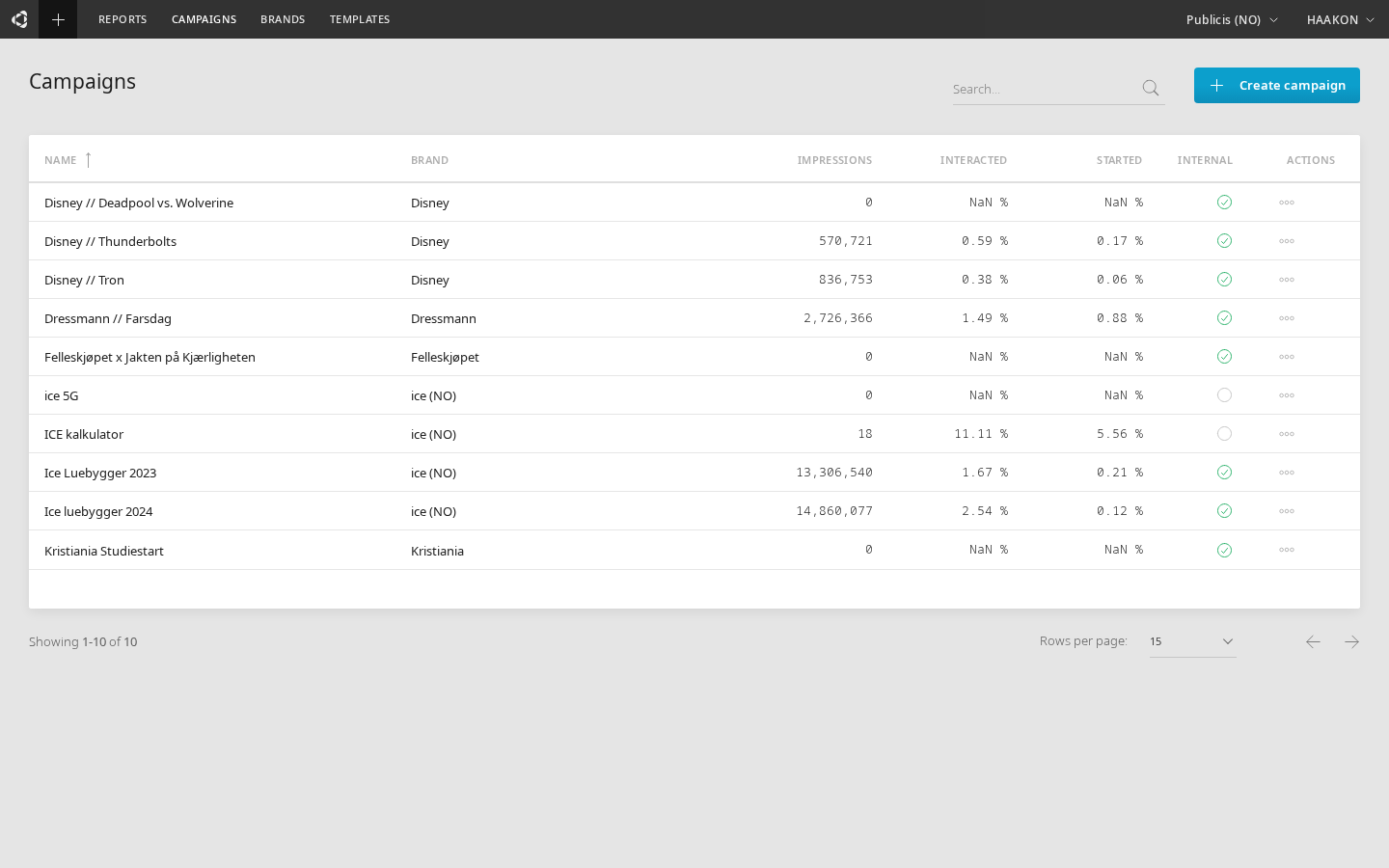
The Campaigns view lists all campaigns within a given scope — enterprise, workspace, or brand. Campaigns are the top-level organizational unit for grouping creative groups and their creatives.
Campaign hierarchy
A campaign belongs to a brand, which belongs to a workspace, which belongs to an enterprise. Below the campaign level, creatives are organized into creative groups.
Enterprise → Workspace → Brand → Campaign → Creative Group → CreativeTable columns
The campaigns table shows the following columns. Some columns are only visible to global (admin) users.
| Column | Description |
|---|---|
| Name | Campaign name (click to view its creative groups) |
| Enterprise | Parent enterprise (visible when viewing across enterprises) |
| Workspace | Parent workspace (visible when viewing across workspaces) |
| Brand | The brand the campaign belongs to |
| Impressions | Total ad impressions (click to open a report) |
| Interacted | Percentage of impressions that led to an interaction (click to open a report) |
| Started | Percentage of impressions that led to starting a conversation (click to open a report) |
| Is Internal | Whether the campaign is marked as internal (global users only) |
| Actions | Opens the actions menu |
The table supports search by campaign name, sorting by name, and pagination.
Creating a campaign
Click Create campaign to open the creation form. The required fields are:
- Name — the campaign name
- Workspace — which workspace the campaign belongs to
- Brand — which brand within that workspace
Global users also see:
- Enterprise selector (cascading — selecting an enterprise filters the available workspaces)
- Is Internal toggle (defaults to on for global users)
You can optionally upload a campaign logo (JPG or PNG, max 2 MB).
Actions menu
Click the actions button on any campaign row to access:
| Action | Description |
|---|---|
| Edit | Edit the campaign name, brand, internal flag, and logo |
| Clone | Create a full copy of the campaign including all creative groups and creatives. You'll be prompted for a new name. |
| Delete | Soft-delete the campaign and all its creative groups and creatives. Deletion is blocked if any creatives are currently being delivered. |
Soft delete
Deleted campaigns can be restored from the Trash. When a campaign is deleted, all nested creative groups and creatives are also soft-deleted and can be restored together.
Moving a campaign
When editing a campaign, you can change its brand. If the new brand is in a different workspace, the campaign and all its creative groups and creatives are automatically moved to the new workspace.
Other functionality
- Clicking a campaign name navigates to its creative groups
- Clicking Impressions, Interacted, or Started opens a filtered report for that metric
- Filter campaigns by brand using the brand selector at the top of the view